
Doom on the iPhone and iPod Touch, while still a work in progress, is shaping up well. It supports the retail/commercial WAD (game data) files for Doom 1 and Doom 2, assuming you provide them. Constructive feedback is greatly welcome. More detailed instructions and videos of it in action coming soon! Meanwhile, hop on Cydia and grab the "Doom" package in the "Games" section!I've been working hard on this since March and have recently been graced in having Zodttd help out in getting the audio and final details ready for the release. We'll keep at it, so if you have any feedback feel free to contact either of us directly. -S
DOOM hits the iPhone
Zodttd and I officially declare DOOM for iPhone to be released! From zodttd.com:

How to enable Emoji systemwide
As an addendum to my last post, I decided to figure out how to enable Emoji systemwide. My findings were first posted on Twitter, but I'm putting them here for persistence.
You need to edit the file /User/Library/Preferences/com.apple.Preferences.plist on the device -> whether you use a jailbreak to achieve this or merely some iTunes backup editor is up to you.
Add the following boolean key as 'true':
KeyboardEmojiEverywhere
Then merely go to the Keyboards section of the Settings app, hit Japanese, and turn on Emoji. Will work for any text field/view in the OS, including on websites, AND including the titles of items on SpringBoard (e.g. if you save a bookmark to the home screen).
Have fun!
Emoji in iPhone 2.2
 In iPhoneOS 2.2 Apple added a feature for Japanese devices called 'Emoji' -> basically unicode smilies that can be used in SMS. The only catch is it's soft-locked to those using Softbank as a carrier. Doh!
Well, if you as a developer just wanna try out the Emoji keyboard and see what they look like, try this in your code (you must already have a keyboard visible or it wont work):
In iPhoneOS 2.2 Apple added a feature for Japanese devices called 'Emoji' -> basically unicode smilies that can be used in SMS. The only catch is it's soft-locked to those using Softbank as a carrier. Doh!
Well, if you as a developer just wanna try out the Emoji keyboard and see what they look like, try this in your code (you must already have a keyboard visible or it wont work):
UIView *_emojiKB =[[NSClassFromString(@"UIKeyboardLayoutEmoji") alloc] initWithFrame:[[NSClassFromString(@"UIKeyboard") activeKeyboard] bounds]];
[[NSClassFromString(@"UIKeyboard") activeKeyboard] addSubview:_emojiKB];
OpeniBoot
Just last night I checked out the OpeniBoot project to see how it was getting along (OpeniBoot is an open-source bootloader for iPhone whose goal is to replace the Apple-made 'iBoot' as the first thing the device boots; this will allow the booting of custom OSes like Linux in the future).


After toying around for a bit setting up the cross-compiler and hacking at the sources to build properly for me, I managed to get it running. Major props to planetbeing for his awesome work on this.
But, the default boot menu I didn't like ;-) I decided to one-up it, so this is what I came up with. If you want the source to my edit (only), it's attached here.


TC - a new Twitter application for iPhone and MacOS
Announcing TC, the ultra-simple Twitter client, inspired by Tapulous' Twinkle, for Mac and iPhone.
iPhone version coming soon to an App Store near you!


Preliminary Sales Data for App Store Month 1
These aren't the official numbers yet by any means, but this is the sales data for the first 28 since I started selling on iTunes.
Speed has been available for 28 days, SameGame 21, and Nuker has only been up a single day so far; total sales for each app are shown on chart:
 Both Speed 2.0 and an updated SameGame are getting closer to release, and I think they will offer things to please many more users. Nuker also has an upgrade path which should see it steadily improved over the next few months, so keep grabbing the apps from iTunes and show your support!
Lights Off is my next major target, and I've been very slow as regards progress on it, but it's squarely in my iron sight for now and I'll try and get it finished as soon as possible. Forget what you know about the original, the new game will have some nice improvements and extras while still keeping as lean as possible. Watch this space!
Those following me on Twitter will have also been subjected to many in-development screenshots of two more iPhone applications which will hopefully see the light of day soon. Both, (a Twitter client and a Tumblr client), are very simple, single-function apps like the rest of my range.
SameGame's 99c sale will be ending in four days, sometime next Thursday (GMT) so if you were thinking about getting it, now is the time to do it. SameGame has *many* new things coming along the pipeline as free updates, even if it looks a little bare right now, and its regular price will be $2.99.
Hope you're all enjoying, and thanks for your custom!
-S
Both Speed 2.0 and an updated SameGame are getting closer to release, and I think they will offer things to please many more users. Nuker also has an upgrade path which should see it steadily improved over the next few months, so keep grabbing the apps from iTunes and show your support!
Lights Off is my next major target, and I've been very slow as regards progress on it, but it's squarely in my iron sight for now and I'll try and get it finished as soon as possible. Forget what you know about the original, the new game will have some nice improvements and extras while still keeping as lean as possible. Watch this space!
Those following me on Twitter will have also been subjected to many in-development screenshots of two more iPhone applications which will hopefully see the light of day soon. Both, (a Twitter client and a Tumblr client), are very simple, single-function apps like the rest of my range.
SameGame's 99c sale will be ending in four days, sometime next Thursday (GMT) so if you were thinking about getting it, now is the time to do it. SameGame has *many* new things coming along the pipeline as free updates, even if it looks a little bare right now, and its regular price will be $2.99.
Hope you're all enjoying, and thanks for your custom!
-S
 Both Speed 2.0 and an updated SameGame are getting closer to release, and I think they will offer things to please many more users. Nuker also has an upgrade path which should see it steadily improved over the next few months, so keep grabbing the apps from iTunes and show your support!
Lights Off is my next major target, and I've been very slow as regards progress on it, but it's squarely in my iron sight for now and I'll try and get it finished as soon as possible. Forget what you know about the original, the new game will have some nice improvements and extras while still keeping as lean as possible. Watch this space!
Those following me on Twitter will have also been subjected to many in-development screenshots of two more iPhone applications which will hopefully see the light of day soon. Both, (a Twitter client and a Tumblr client), are very simple, single-function apps like the rest of my range.
SameGame's 99c sale will be ending in four days, sometime next Thursday (GMT) so if you were thinking about getting it, now is the time to do it. SameGame has *many* new things coming along the pipeline as free updates, even if it looks a little bare right now, and its regular price will be $2.99.
Hope you're all enjoying, and thanks for your custom!
-S
Both Speed 2.0 and an updated SameGame are getting closer to release, and I think they will offer things to please many more users. Nuker also has an upgrade path which should see it steadily improved over the next few months, so keep grabbing the apps from iTunes and show your support!
Lights Off is my next major target, and I've been very slow as regards progress on it, but it's squarely in my iron sight for now and I'll try and get it finished as soon as possible. Forget what you know about the original, the new game will have some nice improvements and extras while still keeping as lean as possible. Watch this space!
Those following me on Twitter will have also been subjected to many in-development screenshots of two more iPhone applications which will hopefully see the light of day soon. Both, (a Twitter client and a Tumblr client), are very simple, single-function apps like the rest of my range.
SameGame's 99c sale will be ending in four days, sometime next Thursday (GMT) so if you were thinking about getting it, now is the time to do it. SameGame has *many* new things coming along the pipeline as free updates, even if it looks a little bare right now, and its regular price will be $2.99.
Hope you're all enjoying, and thanks for your custom!
-S
Nuker hits the App Store
Well folks, it spent many moons in review, but Nuker has finally been approved for the App Store!
Go grab it now for only 99¢/79c/59p/1.19AUD, and tell your friends! In the pipeline for next update: Windows 3.x, 95, NT 3.x and NT 4.0 support.
(App Store Link)


A Twitter Client
So last night I came to the realization that I didn't like *any* of the Twitter clients for Mac OS X, but instead of accepting the 'grin and bear it' mentality, I decided to write my own.
"What would an ideal Twitter client be for me", I wondered. I shortly realized that I already had one, on my iPhone! Twinkle is what I've been using for the past few months, and I absolutely love the minimal but pretty UI it had. If I was going to go ahead and make a desktop client, I wanted it to look similar to Twinkle.
An hour later, and I had this all up and running using Matt Gemmell's MGTwitterEngine:
 Sure, not bad for a first start, but not yet what I wanted. I had decided to use the WebKit rendering engine for the app's UI, as it allowed really quick layout and design with maximum extensibility. But I soon knew I wanted more than the default WebKit gives, so I investigated the WebKit nightlies mainly for their gradient support.
Very soon, I had an app with an embedded nightly WebKit (after a big of install_name_tool hacking!), and extended the design until it looked like this:
Sure, not bad for a first start, but not yet what I wanted. I had decided to use the WebKit rendering engine for the app's UI, as it allowed really quick layout and design with maximum extensibility. But I soon knew I wanted more than the default WebKit gives, so I investigated the WebKit nightlies mainly for their gradient support.
Very soon, I had an app with an embedded nightly WebKit (after a big of install_name_tool hacking!), and extended the design until it looked like this:
 As expected, links and usernames are clickable and will open up in Safari; using HTML, CSS and JavaScript I'm able to make some very nice effects and I use the WebScriptObject methods to allow my WebKit-rendered UI to interact fully with the application code, allowing the user to click on any tweet to start an @reply to said tweet.
What I have to sort out next is direct messaging, and image uploading support (uploading directly to TwitPic from the app).
Anyway, that's just a quick glimpse as to what I'm working on; I haven't decided whether I will release this or not yet, but I've had a significant number of requests, so I'll look into it. Until then, pretty pictures will have to do! =]
As expected, links and usernames are clickable and will open up in Safari; using HTML, CSS and JavaScript I'm able to make some very nice effects and I use the WebScriptObject methods to allow my WebKit-rendered UI to interact fully with the application code, allowing the user to click on any tweet to start an @reply to said tweet.
What I have to sort out next is direct messaging, and image uploading support (uploading directly to TwitPic from the app).
Anyway, that's just a quick glimpse as to what I'm working on; I haven't decided whether I will release this or not yet, but I've had a significant number of requests, so I'll look into it. Until then, pretty pictures will have to do! =]
 Sure, not bad for a first start, but not yet what I wanted. I had decided to use the WebKit rendering engine for the app's UI, as it allowed really quick layout and design with maximum extensibility. But I soon knew I wanted more than the default WebKit gives, so I investigated the WebKit nightlies mainly for their gradient support.
Very soon, I had an app with an embedded nightly WebKit (after a big of install_name_tool hacking!), and extended the design until it looked like this:
Sure, not bad for a first start, but not yet what I wanted. I had decided to use the WebKit rendering engine for the app's UI, as it allowed really quick layout and design with maximum extensibility. But I soon knew I wanted more than the default WebKit gives, so I investigated the WebKit nightlies mainly for their gradient support.
Very soon, I had an app with an embedded nightly WebKit (after a big of install_name_tool hacking!), and extended the design until it looked like this:
 As expected, links and usernames are clickable and will open up in Safari; using HTML, CSS and JavaScript I'm able to make some very nice effects and I use the WebScriptObject methods to allow my WebKit-rendered UI to interact fully with the application code, allowing the user to click on any tweet to start an @reply to said tweet.
What I have to sort out next is direct messaging, and image uploading support (uploading directly to TwitPic from the app).
Anyway, that's just a quick glimpse as to what I'm working on; I haven't decided whether I will release this or not yet, but I've had a significant number of requests, so I'll look into it. Until then, pretty pictures will have to do! =]
As expected, links and usernames are clickable and will open up in Safari; using HTML, CSS and JavaScript I'm able to make some very nice effects and I use the WebScriptObject methods to allow my WebKit-rendered UI to interact fully with the application code, allowing the user to click on any tweet to start an @reply to said tweet.
What I have to sort out next is direct messaging, and image uploading support (uploading directly to TwitPic from the app).
Anyway, that's just a quick glimpse as to what I'm working on; I haven't decided whether I will release this or not yet, but I've had a significant number of requests, so I'll look into it. Until then, pretty pictures will have to do! =]
MacBook Pro: Development Platform Update
My new MBP finally arrived yesterday evening, so here are some of the usual 'brand new' pictures of it =) This is my new development platform, moving from MacBook Air, and I'm very excited about the OpenCL and graphics possibilities it will open me to in Snow Leopard development.
More pics on Flickr, click any of the images to jump.
-S



Using Dynamic Library Injection with the iPhone Simulator
UPDATE: This method no longer works for iPhone OS SDK 2.2 - please see my new article for an updated method.
Many developers who are not targeting the App Store are developing extensions or plugins to SpringBoard, the iPhone's shell, using a piece of software called MobileSubstrate which simplifies the loading of your own code into SpringBoard.
But, for development and debugging purposes, this takes valuable time as each time you build your plugin you have to delete the old version from the phone, sign your plugin, push the new version to the phone, and restart SpringBoard. All these steps take a little time off your life, but if you have access to the iPhone Simulator included with the SDK things are a bit easier!
You can set up automatic loading of your dynamic library by replacing the SpringBoard binary with a shell script and passing the DYLD_INSERT_LIBRARIES option to the original SpringBoard with the path to your library, or if you want a quick once-off test, you can use gdb as below:
• Run the iPhone Simulator
• Get the PID of the running SpringBoard
• Use gdb to attach to said PID
• Use the following gdb commands to load your code
call (int)dlopen("/path/to/MyPlugin.dylib", 2)
continue
Your code should now inject itself into SpringBoard on the iPhone Simulator so you can test on the desktop, take screenshots, check for leaks, or merely stress test your application against the different builds of the iPhone OS (the Simulator allows version switching on the fly).
For me, I find this very useful (I use the DYLD_INSERT_LIBRARIES method) so that I can iterate very quickly when developing Stack. You can also get the console output from SpringBoard by launching the iPhone Simulator from Terminal, so for debugging it's very important.
Hope this post may be of some use.
-SPuzzllotto Non-US Version?
An interesting rumor floated its way to me today regarding Puzzllotto…
I'm told United Lemur are gearing up a version of Puzzllotto for sale outside the US in the next few days, which won't have the monetary prize because of legal reasons. Similarly, the name will be "Lemur Puzzle" (no lotto this time!).
I can't of course verify all this, but if it's true then the race is on! Will the U.S. be the first to complete the game? Or does the rest of the world have a fighting chance, even with America's head-start?
I think it will be very interesting to see what happens…
=)
Android 1.0 Source Release + Notes
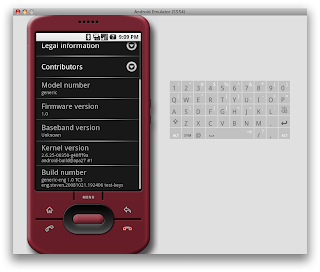
Just pulled and compiled the Android 1.0 source and have it running in the emulator; took just over an hour to compile here for the entire system (minus WebKit - see below), and I can't imagine any OS compiling that fast =)
WebKit is as of now timing out when you go and try to download the source. If you really want to compile Android without WebKit, here's how (you should have already followed the steps on the project site to set up the code):
• "repo sync" until it complains about not being able to download WebKit
• Edit your _androiddir_/.repo/manifest.xml and find the 'webkit' part. Remove from to for WebKit, and save.
• "repo sync" (everything should download)
• Run 'make' when all the code is unpacked. This will compile everything and make the disk images to run in the emulator from the Android 1.0 SDK.
• IMPORTANT: Run your EXISTING 1.0 SDK (the one downloaded from the project site), and use adb to pull out /system/lib/libwebcore.so (adb pull /system/lib/libwebcore.so ~/libwebcore.so)
• Copy your _androiddir_/out/target/product/generic/*.img to the location of the Android SDK disk images (_sdkdir_/tools/lib/images) - backup the SDK images first!
• IMPORTANT: Run the SDK emulator now and it should auto-load your compiled disk images. Now use "adb remount" then "adb push ~/libwebcore.so /system/lib/libwebcore.so"
• Your compiled Android 1.0 should now boot to the desktop
(You will need to perform the remount & push every time you run the emulator, for reference)

TextGuru 1.1 Preview
I'm going to be all naughty here and show off some of the awesome improvements in TextGuru 1.1 (which has yet to be announced).
• Proper file/folder management
• Quick file sharing
• A full FTP client
• Web file downloading
TextGuru is a truly powerful app, and expect to see more cool features soon!
Keep an eye on http://brancipater.com/.


Future?
Well as of now I have a lot of projects going on!
I am readying Speed 2.0 for the App Store, finishing Lights Off, coding up Stack 2.0.1, designing something special for TextGuru, and have submitted two more applications to the App Store!
There's hardly time to breathe with all this, but even so I'm taking on new projects - something top secret right now, so can't talk about it =) Also, need to schedule some proper time with Zodttd to finally finish Doom and release it (Cydia).
I'll have more info in the coming weeks as things slot into place, but until then, if you want to help out you can buy Speed on the App Store for a mere 99c!
Thanks to everyone putting up with me
-S
Subscribe to:
Posts (Atom)
